
External Payments
Most payments are processed through the Volume checkout experience. However, some customers may make manual bank transfers by accessing their banking app, reviewing previous transactions, and reusing past transfers. These payments are sent directly to your virtual account and are recorded by Volume as external payments.
Because these payments are initiated outside of the Volume system, they usually do not include a standard reference or merchantPaymentId.
Viewing External Payments:
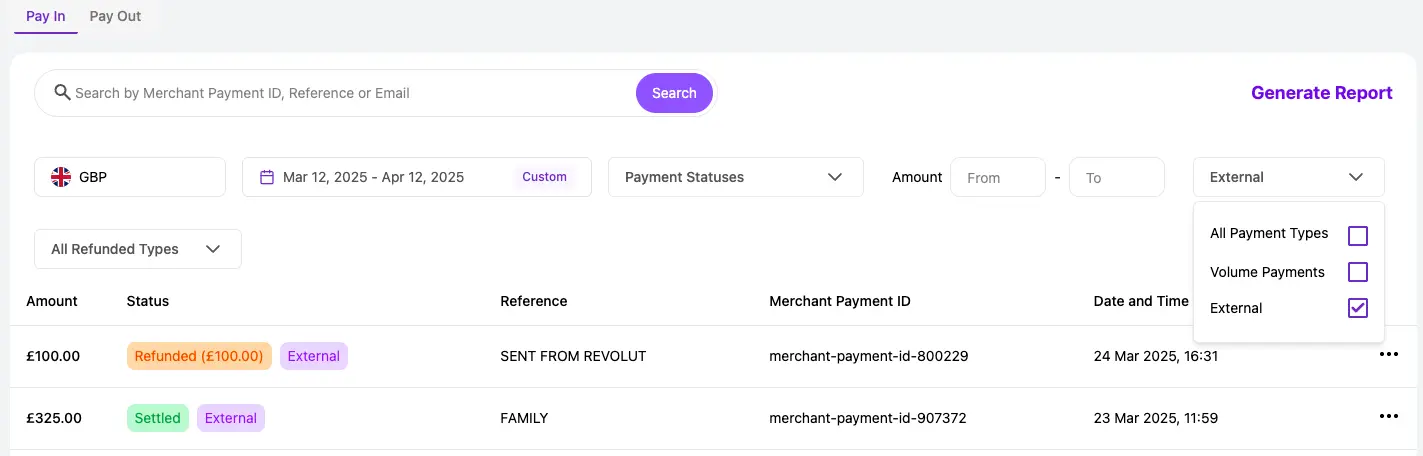
External payments can be identified in the Merchant Portal dashboard by using the "External" filter. These transactions are clearly labeled as "External" for easy recognition.
External Payment Notifications
You can subscribe to notifications for external payments to stay informed whenever they occur. This allows you to take timely and appropriate action.
Configuration:
Notifications can be managed in the Merchant Portal under the "Notifications" tab.
You can receive alerts via webhook, email, or both, depending on your preference.
This ensures that external payments are visible and actionable, helping you maintain accurate records and manage your accounts effectively.